
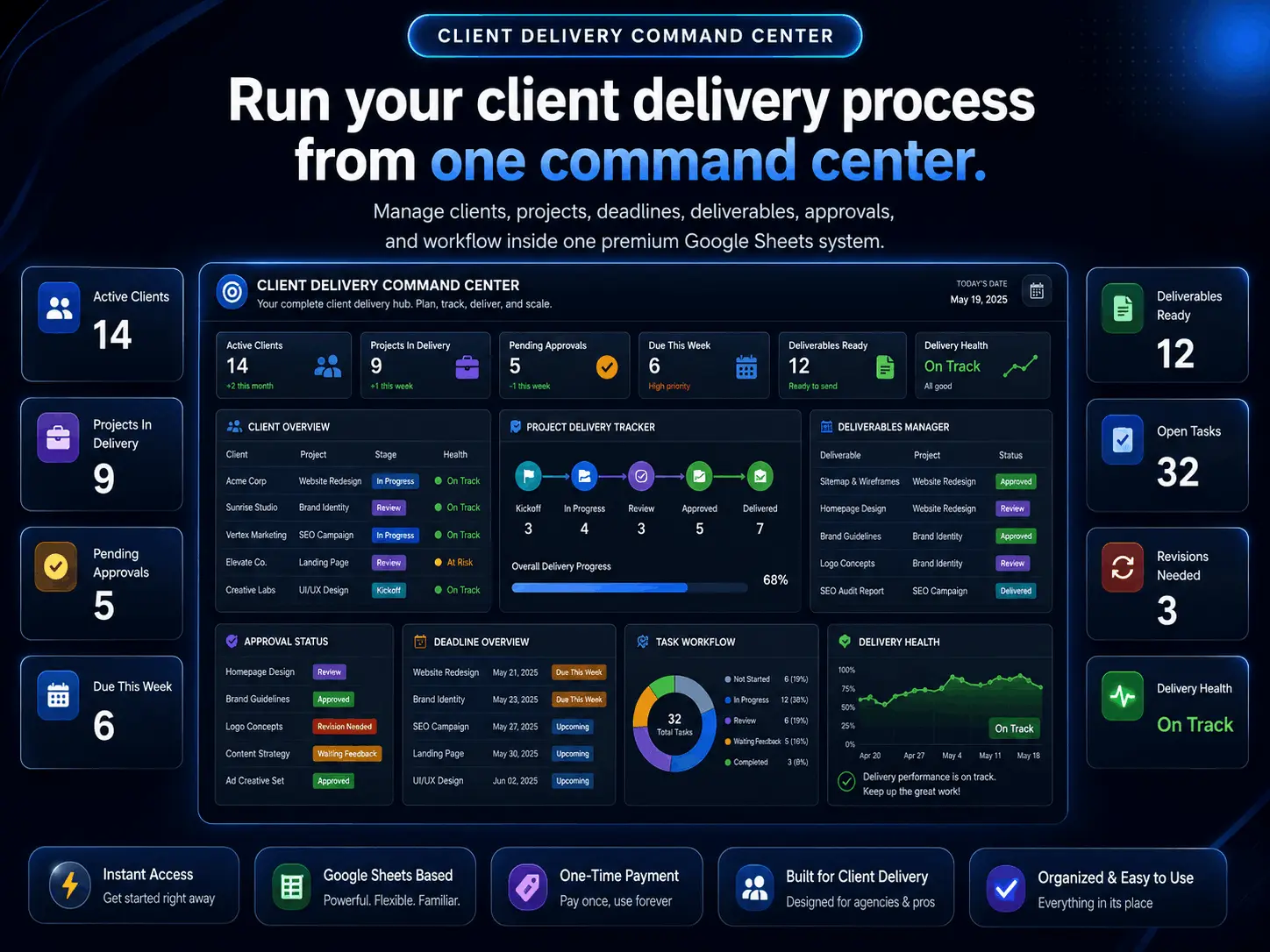
Client Delivery Command Center for Google Sheets
A premium Google Sheets client delivery system built to help freelancers, agencies, and service providers manage onboarding, deliverables, revisions, deadlines, approvals, payments, and final handoff from one organized workspace.
- ✓Client Onboarding Tracker — organize client details, project requirements, and setup steps
- ✓Deliverables Dashboard — track every client deliverable, deadline, and status
- ✓Revision Tracker — manage feedback rounds, requested changes, and approval status
- ✓Delivery Timeline — keep project milestones, due dates, and handoff steps visible
- ✓Payment & Approval Tracker — connect delivery progress with payment and approval status
- ✓Client Notes & Handoff Hub — keep instructions, links, files, and final delivery notes organized
Secure checkout by Stripe • Instant digital delivery • One-time payment • Works in Google Sheets
How it works
Start managing your client delivery in under 2 minutes
From checkout to a working delivery command center, the setup is fast, simple, and built for freelancers, agencies, and service providers managing onboarding, deliverables, revisions, approvals, and final handoff.
Secure Checkout
Complete your purchase with a one-time payment and get instant confirmation right away.
Instant Delivery
Receive your Client Delivery Command Center access link by email immediately after purchase. No waiting, no manual delivery.
Duplicate & Start
Open it in Google Sheets, duplicate it to your Drive, and start organizing onboarding, deliverables, revisions, approvals, payments, and handoff.
No installation, no complex delivery software, and no monthly tools to manage.
Everything Included
6 connected tabs for managing client delivery from start to finish
Client Delivery Command Center gives you one organized Google Sheets workspace to manage onboarding, deliverables, revisions, deadlines, approvals, payments, and final handoff without scattered notes, messages, and separate trackers.
Tab 01 · Client Onboarding
Organize every new client before work begins
Use this tab to collect client details, service type, project scope, requirements, access notes, and onboarding steps.
Include
- Client name and contact details
- Service/package purchased
- Project start date
- Client requirements
- Access or login notes
- Onboarding checklist
- Internal setup status
Tab 02 · Deliverables Dashboard
Track every client deliverable in one place
This is the main workspace for managing what needs to be created, completed, reviewed, or delivered.
Include
- Deliverable name
- Client name
- Project/category
- Priority level
- Status
- Owner
- Due date
- Delivery notes
Tab 03 · Revision Tracker
Manage feedback rounds without losing control
This tab helps track client feedback, revision requests, approval rounds, and final sign-off.
Include
- Revision request
- Related deliverable
- Client feedback summary
- Revision status
- Requested date
- Completed date
- Approval status
- Notes
Tab 04 · Delivery Timeline
Keep deadlines, milestones, and handoff steps visible
This tab gives a clear timeline of what is due, what is late, and what is ready for delivery.
Include
- Project milestone
- Client
- Deadline
- Current stage
- Risk level
- Next action
- Handoff date
- Completion status
Tab 05 · Payments & Approvals
Connect delivery progress with payment and approval status
This tab helps service providers see which clients have paid, which payments are pending, and which projects are approved for delivery.
Include
- Project value
- Payment status
- Deposit status
- Remaining balance
- Approval status
- Final delivery status
- Invoice/payment notes
Tab 06 · Client Handoff Hub
Keep final delivery organized and professional
Use this tab for final links, instructions, deliverable notes, client access details, and handoff confirmation.
Include
- Final delivery link
- Client instructions
- Access notes
- Delivery checklist
- Final approval
- Handoff date
- Support/follow-up notes
Everything you need to deliver client work professionally — onboarding, deliverables, revisions, timelines, payments, approvals, and final handoff — all in one organized workspace.
BENEFITS
Why service providers use this command center to deliver client work professionally
Onboarding clarity
Start every project organized with client details, requirements, access notes, and a clear setup checklist in one place.
Delivery control
See every deliverable, deadline, priority, and current stage so nothing slips between client messages and project files.
Revision & approval clarity
Track every feedback round, requested change, and client sign-off so revisions never spiral or get lost in email threads.
Payment alignment
Connect deliverables, milestones, and handoff to payment status so you always know what's paid, pending, or overdue.
SUPPORT
Frequently asked questions
No. Client Delivery Command Center is a one-time purchase. You pay once and get lifetime access with no recurring fees or hidden charges.
You will receive access by email immediately after purchase. Open the file in Google Sheets, duplicate it to your Google Drive, and start using it right away.
No. The command center works directly inside Google Sheets, so there is nothing to install. You only need a free Google account to make your own copy.
Yes. After duplicating the workbook to your Google Drive, you can fully customize it to match your own clients, services, deliverables, revision stages, payment statuses, approvals, and handoff workflow.
No. This is a digital product. Nothing is shipped physically — you get instant access online immediately after payment.
It is built for freelancers, agencies, consultants, designers, marketers, and service providers managing client work from onboarding through deliverables, revisions, approvals, payments, and final handoff.
Yes. The system is built to track multiple clients in parallel — each tab is structured so you can filter and organize work by client, project, deliverable, and status without losing context.
Yes. Because it runs inside Google Sheets, you can use it on desktop, tablet, and mobile through the free Google Sheets app or any web browser.
Yes. Email support is included if you need help accessing the file or getting set up inside Google Sheets.
Deliver client work professionally from one command center
Get instant access to your Client Delivery Command Center. No subscription. No setup. Just organized onboarding, deliverables, revisions, approvals, payments, and final handoff.
Get Instant Access — €99.99