
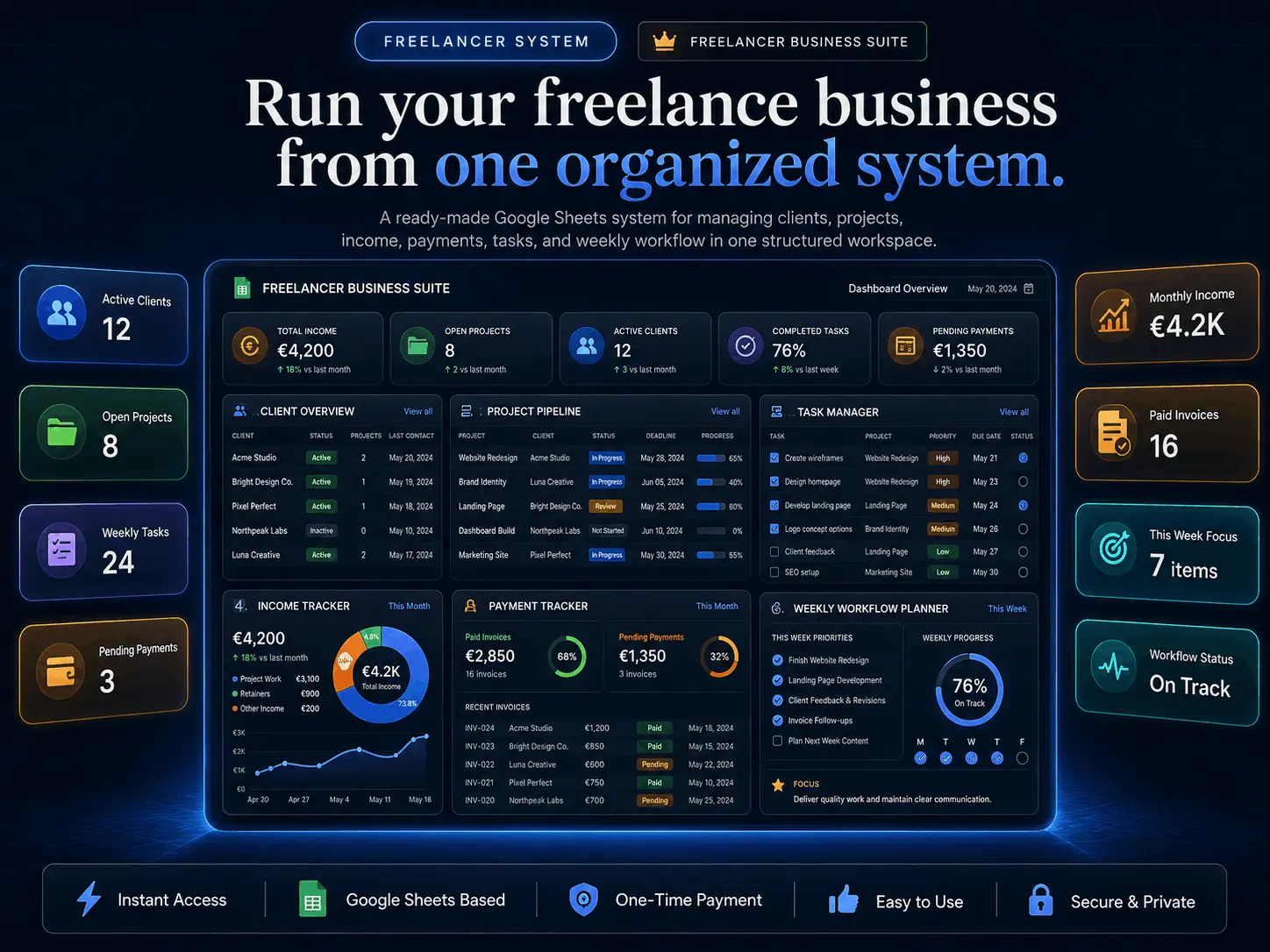
Freelancer Business Suite for Google Sheets
Manage your clients, projects, income, payments, tasks, and weekly workflow inside one organized Google Sheets system — built for freelancers who want more control without complicated software.
- ✓6 Connected Tabs — clients, projects, payments, expenses, tasks, and weekly workflow
- ✓Client & Project Tracker — manage clients, deliverables, statuses, and deadlines in one view
- ✓Income & Payment Tracker — monitor revenue, expenses, profit, and unpaid invoices
- ✓Weekly Workflow Planner — plan priorities and tasks with a clear freelance routine
- ✓Instant Download — duplicate to your Google Drive and start in seconds
- ✓Lifetime Access & Support — one-time payment with email support included
Secure checkout by Stripe • Instant digital delivery • One-time payment • Works in Google Sheets
How it works
Start running your freelance business in under 2 minutes
From checkout to a working freelance dashboard, the setup is fast, simple, and built for freelancers managing clients, projects, payments, tasks, and weekly workflow.
Secure Checkout
Complete your purchase with a one-time payment and get instant confirmation right away.
Instant Delivery
Receive your Freelancer Business Suite access link by email immediately after purchase. No waiting, no manual delivery.
Duplicate & Start
Open it in Google Sheets, duplicate it to your Drive, and start organizing clients, projects, payments, tasks, and your weekly workflow.
No installation, no complex freelance software, and no monthly tools to manage.
What's Inside the Suite
Everything you need to manage your freelance business
Freelancer Business Suite combines client management, project tracking, finance visibility, task planning, and weekly organization inside one connected Google Sheets system.
Module 01 · Client CRM
Manage every freelance client in one place
A clean, organized client database to keep every relationship and project status visible at a glance.
- Client name
- Contact details
- Service type
- Project status
- Payment status
- Notes
- Follow-up reminders
Module 02 · Project Tracker
Track every project from start to delivery
Follow each freelance project through stages, deadlines, priorities, and revisions without losing track.
- Project name
- Client
- Start date
- Deadline
- Current stage
- Priority
- Delivery status
- Revision status
Module 03 · Income & Payments
See your freelance revenue clearly
Track every euro coming in, who paid, who hasn't, and what's overdue — all in one financial view.
- Paid payments
- Pending payments
- Overdue payments
- Monthly income
- Client payment status
- Project value
- Payment method notes
Module 04 · Expense & Profit
Know how much your business actually keeps
Log your business expenses, see real profit, and break costs down by category every month.
- Business expenses
- Monthly cost tracking
- Revenue vs expenses
- Estimated profit
- Category breakdown
- Monthly summary
Module 05 · Weekly Workflow
Plan your week like a serious freelancer
Map out priorities, client work, admin, and deadlines so every day starts with a clear plan.
- Weekly priorities
- Daily task planning
- Client work schedule
- Admin tasks
- Delivery deadlines
- Follow-up tasks
Module 06 · Freelancer Dashboard
Get a full overview of your business
One high-level view of clients, projects, revenue, payments, and performance — updated as you work.
- Active clients
- Active projects
- Monthly revenue
- Pending payments
- Completed projects
- Weekly task progress
- Business performance summary
Everything you need to manage your freelance business — clients, projects, income, expenses, weekly workflow, and performance — all in one connected workspace.
BENEFITS
Why freelancers use this suite to run their business with clarity
Client clarity
Keep every freelance client, contact, project status, and follow-up organized in one connected workspace.
Project control
Track every project by stage, deadline, priority, and revision so nothing slips between conversations and files.
Money & profit visibility
See income, unpaid invoices, expenses, and real monthly profit clearly — no more guessing how the business is doing.
Weekly focus
Plan priorities, client work, admin, and deadlines so every week starts with a clear plan instead of a long to-do list.
SUPPORT
Frequently asked questions
No. Freelancer Business Suite is a one-time purchase. You pay once and get lifetime access with no recurring fees or hidden charges.
You will receive access by email immediately after purchase. Open the file in Google Sheets, duplicate it to your Google Drive, and start using it right away.
No. The suite works directly inside Google Sheets, so there is nothing to install. You only need a free Google account to make your own copy.
Yes. After duplicating the workbook to your Google Drive, you can fully customize it to match your own clients, services, projects, payments, expenses, tasks, and weekly workflow.
No. This is a digital product. Nothing is shipped physically — you get instant access online immediately after payment.
It is built for freelancers, solo service providers, consultants, and self-employed professionals managing clients, projects, income, payments, expenses, tasks, and their weekly workflow.
Yes. Because it runs inside Google Sheets, you can use it on desktop, tablet, and mobile through the free Google Sheets app or any web browser.
Yes. Email support is included if you need help accessing the file or getting set up inside Google Sheets.
Run your freelance business from one organized system
Get instant access to your Freelancer Business Suite. No subscription. No setup. Just organized clients, projects, income, payments, tasks, and your weekly workflow.
Get Instant Access — €89.99